The Universal Pub/Sub: From Event Aggregator to ESB

In our last post, we saw how raw C# events rescued us from the nightmare of cyclic dependencies in the Bill of Materials simulator, enabling lightning-fast cost recalculations and decoupling our Part objects. That was a huge win for internal, object-to-object communication. But the story of managing events doesn’t end there. Sometimes, even basic events can lead to a different kind of complexity, pointing towards a universal pattern.


Part 1: The Budget Simulator and Internal Event Aggregation

A few years ago, I was tasked with a fascinating project: building a budget simulator for an economist at my company. Their existing tool, Excel, had hit its limits—the sheer volume and complexity of the projections simply overwhelmed it. The challenge wasn’t just building a more robust calculation engine; it was also preserving the user experience. They were deeply accustomed to the spreadsheet-like interface and wanted me to emulate that as closely as possible.

So, I set out to build a robust domain model in C# to handle the economic projections, using WinForms and some open-source controls for the UI portion. Similar to my BOM simulator experience, I initially relied on events to refresh calculations when underlying data changed. If a ProjectedRevenue object updated, it would raise an event, prompting recalculations downstream.

However, the UI requirements introduced a new headache. Imagine a complex spreadsheet: changing one value might require updating dozens of dependent cells, charts, and summary panels across the interface. My WinForms controls—individual cells, graphs, data grids—all needed to react. Having a multitude of UI elements subscribing directly to individual domain objects of the underlying model quickly became an absolute nightmare to manage. The UI became tightly coupled to specific model instances, lifetime management was a mess, and tracing what happened when a single value changed was a frustrating exercise in digital forensics.

As I wrestled with this burgeoning complexity, I remembered reading about a design pattern called the Event Aggregator. After doing some deeper research, I realized this was precisely the specialized tool I needed. An Event Aggregator can be thought of as a dedicated Mediator that leverages a Publish/Subscribe (Pub/Sub) mechanism. Instead of my myriad UI elements directly subscribing to individual domain objects, they could now all subscribe to a single object: the Event Aggregator itself. Conversely, my domain objects would publish all of their events to this central aggregator.

This drastically simplified the communication flow, making it much more maintainable. What truly struck me as powerful was the flexibility it offered; you could even introduce logic within the Event Aggregator to transform or combine a set of granular domain events into a single, higher-level event tailored for UI consumption. This pattern completely transformed the maintainability of that budget simulator.


Part 2: Scaling Up to Enterprise Service Buses (ESB)

Years later, I found myself in a different context, working on a research team tasked with finding an integration strategy. We needed to extract data from a commercial accounting SaaS platform for analysis and reporting. This accounting platform fortunately, had a well-defined API that allowed us to subscribe to specific events of interest within their system.

After exploring various options, we decided to implement an Enterprise Service Bus (ESB), specifically WSO2. As we set up the integrations and configured the message flows, a powerful realization hit me. While WSO2 had significantly more bells and whistles—handling message transformations, routing, security, and various communication protocols—the underlying idea was strikingly familiar. It was, at its heart, an object (or rather, a system) that could be subscribed to and that could publish a myriad of different events.

This was the same fundamental principle I had applied with the Event Aggregator in my budget simulator, just scaled up dramatically to an enterprise level.


The Shared Essence: Centralized Pub/Sub for Decoupling

From observer to pub/sub

The Event Aggregator and the Enterprise Service Bus (ESB), despite their vast differences in scale and complexity, both embody the same core architectural principle: a centralized Publish/Subscribe (Pub/Sub) mechanism for decoupling communication.

  • Conceptual Similarity: Both act as a central hub where publishers send messages/events without knowing who will consume them, and subscribers receive messages/events without knowing who produced them. This indirection is the essence of their power.
  • Decoupling: In the budget simulator, the Event Aggregator decoupled UI components from the domain model. With the ESB, this decoupling extends across entire applications and systems, enabling independent evolution and deployment.
  • Scale and Scope: The Event Aggregator operates within a single application process, managing internal object communication. The ESB operates across an enterprise network, integrating multiple, often disparate, applications.
  • Functionality: While both handle Pub/Sub, the ESB adds powerful capabilities like message routing based on content, data transformation (e.g., converting XML to JSON), protocol mediation, security, and orchestration of complex business processes. An Event Aggregator typically focuses solely on event dispatching within an application’s memory.

Ultimately, both patterns are powerful tools for achieving loose coupling. They represent different manifestations of the same underlying idea: enabling flexible, maintainable, and scalable systems by centralizing the communication “switchboard” and allowing components to interact without direct knowledge of each other. This universal pattern, whether applied to objects in memory or distributed systems across a network, forms a critical foundation for building robust software architectures.

The Observer Pattern and Webhooks: Notifying Change with Direct Awareness

Part 1: Taming the MRP Beast with Internal Events

Around 2012, I found myself working at a multinational company that manufactured office supplies and various other products. One of the persistent headaches within the R&D department was their workflow for analyzing the cost impact of material changes. They’d experiment with different components, aiming for those crucial cost reductions without sacrificing quality. However, the process for understanding the financial ramifications was frustratingly slow, relying on the company’s MRP system to run overnight batch jobs for recalculations. This lag time really stifled their ability to iterate and innovate efficiently.

So, naturally, I’m the poor sap who gets told to fix it. My initial thought was an in-memory object graph. Being a firm believer in Test-Driven Development (TDD) and working in C#, I started by defining the behavior I expected from my model. The specifications for these tests were directly derived from the rules and logic of the company’s MRP system. I envisioned a system where any Part in the Bill of Materials could have its cost updated, and that change would automatically propagate up the assembly hierarchy. To model this hierarchical structure efficiently, I leaned heavily on the Composite pattern. In essence, everything became a Part – individual materials were Part instances, and assemblies of parts were also Part instances, capable of containing other Part objects. This elegant pattern allowed me to treat individual components and complex assemblies uniformly.

Then came the real test: those damn cost updates. The idea was, if a tiny part changed price, the entire product’s cost needed to reflect it, instantly. My first attempt felt… logical? Each Part would keep a reference to its parent Part (within the Composite structure). On a Cost change, I would access the parent and invoke a RecalculateCost() method defined in the Part base class. However, this approach quickly revealed the problem of cyclic dependencies because I was serializing the whole graph to a binary file. Cornered and fueled by desperation (and likely too much late-night coding), I turned to events.

I was aware of events in C#, but they weren’t my first choice for this direct propagation problem. However, the cyclic dependency nightmare demanded a different approach. The idea was simple: instead of directly telling any Part what to do, each Part would just whine into the digital void, ‘My cost changed!’ Any Part that contained it (its ‘parent’ in the Composite structure) could subscribe to this event and react accordingly. This loose coupling, this inversion of control, worked like a charm. The overnight wait? Gone. Poof. The once tightly coupled Part instances could now have their costs updated and the entire Bill of Materials recalculated in less than two seconds. Everyone was happy.


Part 2: The Distributed Task Conundrum and the Rise of Webhooks

Years after taming the MRP beast, I faced a new challenge at a different company. This time, the problem revolved around a system where various web applications assigned tasks to users. Some of these tasks were physical, like “pick up item X from shelf Y,” while others were purely digital, such as “review document Z.” The headache? Users had to log into each individual web application to check their assigned tasks, and then log back into that specific application to mark a task as completed. It was an exercise in digital hopping that wasted time and frustrated users.

My goal was to consolidate this chaos. I envisioned a centralized platform where all these disparate task-assigning web applications could publish their tasks. Users would then have a single, unified interface to view all their pending tasks and mark them as complete. The core challenge, however, wasn’t just displaying the tasks; it was figuring out how to notify the originating web application when a task was marked as completed on my new central platform. How would the “Item Picking Application” know that its task “pick up item X” was done without constant, inefficient polling?

This is where I discovered webhooks. At first glance, I wondered if this was just a fancy term for an HTTP request. After all, it was simply my platform making a POST request to a specific URL on another web application. But as I dug deeper, I realized its true power. While a webhook is an HTTP request, its essence lies in its role as an event notification between applications. It struck me then: the underlying principle was the same as with the internal events in my BOM simulator.


The Shared Essence: Events, Webhooks, and Decoupling

In both scenarios, it boiled down to an interested party manifesting its interest in a particular action taking place (the Event) and requesting to be notified in a specific way. In the BOM simulator, that notification was an in-memory method call to an event handler. In the task management system, it was an HTTP request to a specific URL (a webhook endpoint).

This fundamental concept of notifying interested parties without direct coupling is the core idea of the observer pattern. It allows the component initiating the change (e.g., a Part in the BOM, or my central task platform) to remain unaware of who is listening or how they will react. It simply announces that something has happened. This drastically reduces tight dependencies, fostering systems that are more flexible, maintainable, and scalable. Whether you’re working with objects in memory or distributed web applications across a network, the ability to communicate via events, rather than rigid, direct calls, provides a path to more robust and adaptable designs.

Finding Your Way: The Service Locator Pattern from Peer-to-Peer to Microservices

As we explored in the previous post, the object-oriented paradigm encourages us to think about software systems as collections of interacting objects sending messages to one another. This way of thinking provides a powerful mental toolkit for tackling complex design challenges. Before we dive into how this lens helps us understand patterns like the Service Locator, let’s briefly consider the concept of programming paradigms and how the object-oriented one shapes our approach.

A programming paradigm is essentially a fundamental style of building the structure and elements of computer programs. Different paradigms, like procedural, functional, and object-oriented, offer distinct sets of concepts and mental tools for approaching software development.

The object-oriented paradigm centers around the concepts of objects (self-contained entities with state and behavior) and messages (the way these objects interact, carrying intent). When we think in an OO way, we tend to model the problem domain as these interacting entities. This framework helps us break down complexity and design systems with clear boundaries and responsibilities. The power of abstraction in OOD also lies in designing messages that convey what needs to happen without exposing the how.

Now, with this understanding of the object-oriented lens, let’s explore a not-so-loved design pattern: the Service Locator. At its heart, a Service Locator is a central registry that clients consult to find the address or instance of a service or resource they need. It acts as a directory, a guide in a complex landscape.

Although this sound a lot like an inversion of control container, the main difference is that no object gets access to an instance of an IoC container. In contrast, the service locator is provided to the objects that require it. Intriguingly, this pattern isn’t confined to neatly packaged applications. We can find its echoes in unexpected places, from the early days of peer-to-peer file sharing to the modern, intricate world of microservices.

The Original Navigators – Index Sites in BitTorrent

Before the era of ubiquitous streaming, sharing files often meant venturing into the decentralized world of BitTorrent. This peer-to-peer protocol allowed users to download pieces of a file from multiple sources simultaneously. But how did a user even begin to find these sources? This is where index sites (like the early iterations of The Pirate Bay) played a crucial role.

Think of these index sites as rudimentary Service Locators. They didn’t host the actual movies, music, or software. Instead, they maintained a vast directory of .torrent files. A .torrent file contained metadata about the desired content and, critically, the addresses of trackers. Trackers were special servers that kept track of which peers (other users) had which pieces of the file.

When a user searched for a file on an index site (acting as the “client” object), the site would return a .torrent file – essentially, the initial “address” of the resource and the pointers to find it (the tracker information). The user’s BitTorrent client would then use the tracker information within the .torrent file to send messages to the trackers (another type of object). The trackers, in turn, would provide the client with a list of peers (the “service provider” objects) currently sharing the requested file.

The Service Locator aspects here are clear:

  • Centralized Lookup (initially): The index site served as a single point of reference for discovering content and the means to find it.
  • Decoupling: The user didn’t need to know the specific IP addresses of peers hosting the file. The index site facilitated the initial connection.
  • Abstraction: The search interface of the index site hid the underlying complexity of tracker communication and peer discovery.

The Modern Metropolis – Microservice Registries

Fast forward to today, and the architectural landscape is increasingly dominated by microservices. These small, independent services collaborate to build complex applications. In such a distributed environment, how do these services find and communicate with each other? This is where microservice registries (like Consul, Eureka, or ZooKeeper) step in as sophisticated Service Locators.

When a microservice starts up (acting as an “object”), it registers itself with the registry (another “object”), announcing its location (IP address and port) and its capabilities. It essentially says, “Hey, I’m the ‘Order Service,’ and you can find me at this address.” When another service (the “client” object) needs to interact with the “Order Service,” it doesn’t need to know its specific IP address. Instead, it sends a message to the registry asking for the location of the “Order Service.” The registry then provides the current address, allowing the two services to communicate and exchange further messages.

The Service Locator aspects here are striking:

  • Centralized (though often clustered for resilience) Lookup: The registry acts as a well-known and reliable place for services to discover each other.
  • Decoupling: Services don’t have hardcoded dependencies on the network locations of other services. They rely on the registry for dynamic discovery.
  • Abstraction: Services interact using logical names (“Order Service,” “Inventory Service”), and the registry handles the underlying network address resolution.
  • Dynamic Discovery: The registry enables services to be dynamically discovered and scaled. As instances of a service are added or removed, the registry is updated, ensuring clients always have access to available instances.

Echoes of Object-Oriented Design

Drawing parallels between the two scenarios, we see how both index sites and microservice registries solve the fundamental problem of “object” (service/resource) discovery through a centralized “locator.” This pattern facilitates the “message” pathways by providing the necessary “address” information, allowing different parts of the system (objects) to find each other and exchange messages.

Conclusion

The Service Locator pattern, whether in the rudimentary form of a BitTorrent index site or the sophisticated architecture of a microservice registry, illustrates how the core principles of the object-oriented paradigm – particularly the idea of objects needing to communicate and interact – manifest in system design. By thinking in terms of objects and the messages they need to exchange, we can understand and design even large-scale, distributed systems more effectively. In the next post, we’ll continue to explore other system design patterns through this object-oriented lens.

Beyond Classes and Inheritance: The True Heart of Object-Oriented Design

Ever feel like the conversation around Object-Oriented Design (OOD) is drowning in buzzwords like “inheritance” and “polymorphism”? Let’s cut through the noise. At its heart, OOD is about two fundamental things: objects and the messages they send to each other. Everything else? Smart ways to make this interaction work smoothly.

Think of the world around you. It’s full of things that interact. Your phone (an object) sends a message (a call) to another phone (another object). Your browser (object) sends a message (a request) to a server (object). OOD simply models this reality in software.

But these messages are more than just raw data; they carry intent. To illustrate this, consider updating a customer’s address:

Data Flow: Imagine simply sending the customerID, newStreet, newCity, newState, and newZipCode to a service. The service receives this data and has to infer the intent: “Oh, I guess I need to update the address for this customer.” The purpose isn’t explicitly stated in the data itself.

Message Flow (with Intent): Now imagine a “User Interface” object sending a message to a “Customer Profile Service” object. This message explicitly states the intent: UpdateCustomerAddress for the customer with this ID to these new details. The message itself, by its very name and the data it carries, conveys the action to be performed.

A Note on Messages and Methods: It’s common to see the name of a message directly correspond to the name of a method that an object implements to respond to that message. However, remember that this naming convention is primarily an implementation detail. The key is that the object understands the message and has a mechanism (a method) to handle it, regardless of whether the names perfectly align. The message is the intent being communicated, and the method is the implementation of how that intent is fulfilled.

When we say OOD is about “objects and messages,” we’re emphasizing this flow of intent. We’re talking about objects making requests, giving instructions, or announcing occurrences. This is fundamentally different from simply pushing raw data through a pipeline. It’s the difference between giving an order and just handing someone a piece of paper. One drives action; the other requires an active interpreter.

This focus on intent within messages is what makes message-based interaction so powerful. It allows objects to communicate with a clear understanding of what needs to be done, leading to more robust and decoupled systems.

The “Famous Four”: Tools in the Toolbox

Those “four pillars” you often hear about – encapsulation, abstraction, inheritance, and polymorphism – they aren’t the essence of OOD. They’re powerful tools that help us design and build systems based on objects and messages, ensuring these interactions are well-defined and manageable.

The Big Picture:

Understanding OOD as fundamentally about objects exchanging messages with clear intent unlocks a powerful way of thinking about system design, not just code. Suddenly, different parts of a large system – even entire services – can be seen as objects communicating with each other. This perspective allows us to apply the same design principles we use within our applications to the architecture of the whole thing.

Get ready to see how this simple idea plays out in surprising ways, from how you used to download files to how the Internet’s biggest applications work today. In the next post, we’ll dive into a well-known (although not well-loved) example: the Service Locator pattern. You might be surprised where it pops up!

Smalltalk adventures: objects > code + data

Hey everyone! I started dipping my toes into smalltalk, right after reading a quote from Kent Beck stating that to really understand Object Oriented Programming you need to learn smalltalk.

My journey into Smalltalk has been more than just learning a new language; it’s been a shift in how I think about programming. One of the most profound takeaways has been the realization that objects aren’t just data structures with attached functions; they’re a powerful tool for abstraction, completely reshaping how we represent both data and code.

Beyond Data and Code: The Object as a Unifying Concept

In smalltalk the only conceptual tools available are objects and messages. Objects are just things that respond to messages.

In most programming languages, you have data (like numbers or text) and then you have code (like instructions that do stuff with that data). They’re kind of like separate teams working together. But in Smalltalk, it’s a whole different ball game. Everything – and I mean everything – is an object. It’s like all the teams merged into one super-team, where everyone has their own special skills and works together seamlessly.

This means that even things we normally think of as “just data,” like the number 5 or the word “hello,” are actually objects with their own built-in abilities. And the “code” that does stuff with that data? That’s inside the objects too, as little “missions” they can carry out.

This might sound a bit abstract, but it’s actually super helpful. It lets us think about our code at a much higher level. Instead of getting bogged down in the nitty-gritty details of how data is stored or how functions work, we can just focus on how these little objects interact with each other.

Objects as Building Blocks: Making Code Feel Like LEGOs

This object-centered approach makes it so much easier to model real-world things in our code. Imagine you’re building a program for a library. You’d have books, members, librarians – all sorts of things. In Smalltalk, each of these becomes an object. A “book” object has information like its title and author and actions it can perform, like being borrowed or returned.

This makes coding feel a lot like building with LEGOs. You have all these different pieces (objects), each with their own unique properties and abilities, and you can combine them in creative ways to build amazing things. It makes the code much more intuitive and easier to understand, because it mirrors how we think about the real world.

Hiding the Mess: Objects as Neat Little Packages

One of the coolest things about objects is how they hide complexity. When you want an object to do something, you just send it a message. You don’t need to know how it does it; you just need to know what you want it to do.

Think of it like ordering a pizza. You tell the pizza place what you want, and they take care of all the details: making the dough, adding the toppings, baking it in the oven. You don’t need to know how they do all that stuff; you just care about getting your delicious pizza. Objects work the same way. They handle all the messy details internally, so you can focus on the bigger picture.

A Shift in Perspective: From Procedures to Interactions

Smalltalk’s object-centric approach encourages a shift in perspective from thinking about procedures and algorithms to thinking about interactions between objects. Instead of writing long sequences of instructions, you define how objects collaborate to achieve a desired outcome. This leads to more modular, flexible, and maintainable code.

Exploring Smalltalk has been like taking a step back to see the bigger picture of OOP. It’s helped me understand the core principles in a way that I hadn’t before. It’s not about classes and inheritance (heck, javascript didn’t even need them before!); it’s about creating objects that communicate with each other through messages, manage their own state, and use callbacks to orchestrate complex interactions.

If you’re looking to deepen your understanding of OOP, I highly recommend giving Smalltalk a try. It might seem a bit different at first, but trust me, it’s worth the effort. You might just have a few “aha!” moments of your own. And as always feel free to ask questions or leave comments below!

A day at Hunter Industries

About a year or so ago, I had the chance to go on a Hunter Industries virtual tour. Basically, I spend a day working with them. I was looking forward to this since I learned about mob programming, as that’s the place where it was born. It was amazing. I’ve had enough time to reflect on that experience, so I want to share what I believe are the most outstanding traits of that culture

Experiment on everything

I mean, EVERYTHING. The team was working on some JS code and didn’t know how to use the IDE to debug it. The reason was that they were experimenting with using that new IDE that week! They had no prior experience with it (and neither did I) so we were tumbling all along to figure out what was going on at runtime (console.Log anyone?). It was kind of frustrating. But that’s how it is when learning something new.

The main point is that nothing is written in stone. They experiment with team configurations, tooling, work organization, techniques, and everything in between. This is probably the thing I loved the most. There is not a “we do things this way here” mentality but instead a curious, open-minded one. If you have a proposal to do things a different way, the team can give it a try for a time and see how it works. I just wish more organizations were this flexible. After all, all improvement is a deviation from the standard.

Mobbing

So I just spoke about flexibility. As the place where mob programming was invented, I expected the practice to be mandatory. Certainly is the default way of work. But people can pair or go solo as needed. It’s just that flexible.

I have to be honest: the main reason I took the tour was because I wanted to learn firsthand how to do mob programming. I had tried before but it didn’t turn out as I expected. I made many mistakes while trying to implement it. Having the chance to mob with a team experienced in the practice was quite an instructive experience. It seems to me that a lot of the mistakes I made, were just deviating from the simple rules at one point or another. It’s about discipline.

Rest often

The reason we are told to hydrate continuously is not to quench thirst, but to avoid feeling thirsty in the first place. One of the practices we followed strictly was to rest for 10 minutes every 40. With one hour lunch. Even if we were in the middle of something we would stop and take a break. The end result was that I didn’t feel tired after hours of deep concentration work. It was amazing. But it did require discipline.

Rotate often

This is one of the mistakes I made in my earlier attempts. For starters, the lack of some sort of control to keep in check who was next and when. We would often get carried away and forget to rotate who was typing and who was thinking until later on. The effect of this was disengagement from some of the team members. So rotating often is actually a very important thing. We were rotating every 4-5 minutes, but it can vary depending on the team.

Cross-pollination

This is one of those things that sounds too radical to most organizations. It turns out that every so often, the team switches members for a week or so. Since the team works as a mob, getting someone up to speed is actually very fast. Heck, even I could start being productive after an hour or so given that I had never seen that codebase. This way the knowledge of the different products is spread among all the teams. Something to note as well is that no person can remain on the same team for more than 2 years. You can either switch before or at the 2-year limit.

Mini-retros

Something to take into account is the constant feedback received from the environment. You receive feedback from your peers as you bounce your ideas with them. You receive feedback from the unit tests about your code. And then we have the mini-retro at the end of the day. I didn’t expect that but it was actually very cool. One of the things we discussed was the need to learn how to set up the tool for debugging and decided to do that the next day. This was cool because I have been in similar situations before but usually, the momentum just leads me to decide to stick with whatever hack I’ve been doing, even if it’s not optimal. It’s like trying to take down a tree with a blunt axe and deciding there’s no time to sharpen it. By having a small retro at the end of the day, we allow ourselves to pause and reconsider if there are better ways to continue… to sharpen the axe.

Small teams

I was told that the average size of the teams is 4. That’s another of those practices that seem to be irrelevant at first. But as time goes on I’ve come to discover that having 4 people in a team is enough to challenge any idea and see if we can’t come with something better without getting into a deadlock of opinions. Having too many people makes reaching a consensus hard. Having too little makes it hard to have a diversity of ideas. I suspect around 4 may be the sweet spot. Coincidence? a deliberate choice? an unconscious choice? You’ll have to ask them 😉

TDD everywhere

I love TDD. I found it the most effective way to work. If you are trying to give it a try, I suggest to break everything into small tasks. So I found it refreshing to be able to work with other people this way. They we’re all seasoned practitioners and I pick up a few things from them. I believe you can go a long way just working on a mob, but bringing TDD into the scene helps to focus the attention of everyone to a single task: make the specification pass. Refactoring can happen later.

Closing words

A technically sound culture doesn’t happen by accident. It requires deliberate actions. I believe that the cornerstone of the success of the team at Hunter Industries is their relentless pursuit of a better way through constant experimentation. The disposition to try and fail and try something again, has undoubtedly shaped some of the practices metioned here. It just that this implies throwing away the current process, practices, and policies and considering that it’s human nature to fight change, I’m afraid that it will take a long time before we start to see more companies adopt these ideas.

Peeling the onion: understanding encapsulation

Encapsulation vs Information Hiding

Information hiding, as defined by Parnas, is the act of hiding design decisions from other modules, so no impact would be felt if you change such decisions. Encapsulation says nothing about such things. It only cares about grouping related things inside a capsule. It says nothing about the transparency level of such a capsule.

Encapsulation vs access modifiers

Oftentimes I’m asked to interview a candidate to see if he is suitable for a software development position. And 9 of 10 will refer to access modifiers. They will talk about public, private and other keywords, and access levels. Actually, access modifiers are more related to a concept called data hiding.

Encapsulation vs Data Hiding

If you are reading this, chances are that you have already found and read other articles related to the topic. And probably you found a reference to data hiding, saying that encapsulation is a way to achieve data hiding or something along those lines. But that doesn’t really help you have a clearer picture right?

Let’s try to look at it from another angle. What is data hiding about? As the name implies is hiding data from the world. Hiding it how? Well, you hide it behind a boundary. Inside that boundary, a piece of data is well known. But outside of it, it’s non-existent. So data hiding is all about, well, data.

This raises a question: how do you define a boundary for a piece of data?

Encapsulation and Cohesiveness

Well, there’s a well-known principle for creating boundaries: cohesiveness. Cohesiveness is about putting together all things related in some way. The “some way” part of it, can be changing depending on the scope but is usually about behavior.

It means to take the data and the operations that work upon it and draw a boundary around them. Sounds familiar?

So what’s encapsulation?

According to Vladimir Khorikov:

Encapsulation is the act of protecting against data inconsistency

Both data hiding and cohesiveness are guides we use to avoid ending in an inconsistent state. First, you put a boundary around data and the operations that act upon it, and then you step into the data/information hiding domain by making the data invisible (at some level) outside that boundary.

Easy peasy, right? One interesting thing about encapsulation is that it results in abstractions all over the code.

Encapsulation and Abstraction

Abstraction and encapsulation share an intimate relationship.

Simply put, encapsulation leads to the discovering of new abstractions. This is the reason why refactoring works.

Let’s look at some definitions:

In computing, an abstraction layer or abstraction level is a way of hiding the working details of a subsystem, allowing the separation of concerns to facilitate interoperability and platform independence.

wikipedia

In other words, the level of abstraction is the opposite of the level of detail: the higher the abstraction level the lower the level of detail, and vice-versa.

The essence of abstraction is preserving information that is relevant in a given context, and forgetting information that is irrelevant in that context.

– John V. Guttag[1]

So an abstraction (noun) is just the representation of a concept in a way that is relevant to a given context (the abstraction level).

Which is precisely what we do when we encapsulate.

Encapsulation: First abstraction level

Look at the following code:

using System;
using System.Collections.Generic;
    
public class Test
{
    public static void Main()
    {
        decimal total =0;
        decimal tax = 0;
        var order = new Order();

        order.Lines.Add(new OrderLine{ Item = new Item{Name = "Shampoo",Price = 12.95m}, Quantity = 2});
        order.Lines.Add(new OrderLine{ Item = new Item{Name = "Soap",Price = 8m}, Quantity = 5});
        
        foreach(var line in order.Lines)
        {
            total += line.Quantity * line.Item.Price;
        }
        
        tax = total * 0.16m;
        Console.WriteLine( total + tax);
    }    
}

public class Order
{
    public Order(){
        Lines = new List<OrderLine>();
    }
    
    public List<OrderLine> Lines{get;set;}
    
}

public class OrderLine
{
    public Item Item{get;set;}
    public int Quantity {get;set;}
}


public class Item {
    public string Name {get;set;}
    public decimal Price {get;set;}
}

Let’s try to draw some boundaries.
First, let’s look at the variables on the Main method. There are 3: order, total, and tax.
The trick here is to find where these variables are being used.

Let’s start with order.

So, in a nutshell, order is being used to calculate the value of total. Let’s take a look at that variable then.

Here we can see that the total is in reality a subtotal (before taxes) and it’s used to calculate both the tax and the real total which is implicit in the expression total + tax. So let’s fix that, let’s rename the total variable as subtotal, and let’s make the implicit real total explicit by assigning it to a variable called total.

using System;
using System.Collections.Generic;
    
public class Test
{
    public static void Main()
    {
        decimal subtotal = 0;
        decimal tax = 0;
        var order = new Order();

        order.Lines.Add(new OrderLine{ Item = new Item{Name = "Shampoo",Price = 12.95m}, Quantity = 2});
        order.Lines.Add(new OrderLine{ Item = new Item{Name = "Soap",Price = 8m}, Quantity = 5});        
     
        foreach(var line in order.Lines)
        {
            subtotal += line.Quantity * line.Item.Price;
        }
        
        tax = subtotal * 0.16m;

        var total = subtotal + tax;

        Console.WriteLine( total );
    }    
}

Good, now let’s move to the next variable, tax.

As you can see tax is used to calculate the new total. Notice again that we have an implicit piece of data in there, 0.16m, so let’s make it explicit. Remember, you’re looking for data and code that acts upon that data, so try to make the data easy to spot. Let’s rename tax as taxes and put the tax percentage into a variable called tax.

using System;
using System.Collections.Generic;
    
public class Test
{
    public static void Main()
    {
        decimal subtotal = 0;
        decimal taxes = 0;
        var order = new Order();

        order.Lines.Add(new OrderLine{ Item = new Item{Name = "Shampoo",Price = 12.95m}, Quantity = 2});
        order.Lines.Add(new OrderLine{ Item = new Item{Name = "Soap",Price = 8m}, Quantity = 5});        
     
        foreach(var line in order.Lines)
        {
            subtotal += line.Quantity * line.Item.Price;
        }
        
        var tax = 0.16m;
        taxes = subtotal * tax;

        var total = subtotal + taxes;

        Console.WriteLine( total );
    }    
}

Mmmm… I think we can now encapsulate some things. First, that tax variable and the operation used to calculate the value of taxes belong together, so let’s draw a boundary around them.

At the lowest abstraction level, the encapsulation boundary is a function.

using System;
using System.Collections.Generic;
    
public class Test
{
    public static void Main()
    {
        decimal subtotal = 0;
        decimal taxes = 0;
        var order = new Order();

        order.Lines.Add(new OrderLine{ Item = new Item{Name = "Shampoo",Price = 12.95m}, Quantity = 2});
        order.Lines.Add(new OrderLine{ Item = new Item{Name = "Soap",Price = 8m}, Quantity = 5});        
     
        foreach(var line in order.Lines)
        {
            subtotal += line.Quantity * line.Item.Price;
        }
        
       
        taxes = CalculateTaxes(subtotal);

        var total = subtotal + taxes;

        Console.WriteLine( total );
    }

    static decimal CalculateTaxes(decimal amount)
    {
       var tax = 0.16m;
       return amount * tax;
    }
}

Easy peasy, right? Let’s move backward and encapsulate the subtotal calculation.

using System;
using System.Collections.Generic;
    
public class Test
{
    public static void Main()
    {
        decimal subtotal = 0;
        decimal taxes = 0;
        var order = new Order();

        order.Lines.Add(new OrderLine{ Item = new Item{Name = "Shampoo",Price = 12.95m}, Quantity = 2});
        order.Lines.Add(new OrderLine{ Item = new Item{Name = "Soap",Price = 8m}, Quantity = 5});        
     
        subtotal = CalculateSubtotal(order);        
       
        taxes = CalculateTaxes(subtotal);

        var total = subtotal + taxes;

        Console.WriteLine( total );
    }

    static decimal CalculateTaxes(decimal amount)
    {
       var tax = 0.16m;
       return amount * tax;
    }

    static decimal CalculateSubtotal(Order order)
    {
       decimal subtotal = 0;
       
       foreach(var line in order.Lines)
       {
           subtotal += line.Quantity * line.Item.Price;
       }
        
       return subtotal;
    }
}

Something funny it’s going on. Why do we still have data (variables) laying around even after we encapsulate them? They should be non-existent to the world outside of the boundary right? Well, there are ways to go about this. First, since the taxes variable gets used only once, we can replace it with a call to the function.

using System;
using System.Collections.Generic;
    
public class Test
{
    public static void Main()
    {
        decimal subtotal = 0;       
        var order = new Order();

        order.Lines.Add(new OrderLine{ Item = new Item{Name = "Shampoo",Price = 12.95m}, Quantity = 2});
        order.Lines.Add(new OrderLine{ Item = new Item{Name = "Soap",Price = 8m}, Quantity = 5});        
     
        subtotal = CalculateSubtotal(order);        
               
        var total = subtotal + CalculateTaxes(subtotal);

        Console.WriteLine( total );
    }

    static decimal CalculateTaxes(decimal amount)
    {
       var tax = 0.16m;
       return amount * tax;
    }

    static decimal CalculateSubtotal(Order order)
    {
       decimal subtotal = 0;
       
       foreach(var line in order.Lines)
       {
           subtotal += line.Quantity * line.Item.Price;
       }
        
       return subtotal;
    }
}

Now, let’s talk about the subtotal variable. This one is used several times so we can’t replace it as we did previously (we can but it will be recalculating the same value twice). But this should pique our interest. Whenever we find this situation it means there are operations related to this data and we need to further encapsulate! After looking carefully we notice we haven’t done anything about the total variable! Are there any operations related to it? Let’s pack’em up!

using System;
using System.Collections.Generic;
    
public class Test
{
    public static void Main()
    {
        var order = new Order();

        order.Lines.Add(new OrderLine{ Item = new Item{Name = "Shampoo",Price = 12.95m}, Quantity = 2});
        order.Lines.Add(new OrderLine{ Item = new Item{Name = "Soap",Price = 8m}, Quantity = 5});       
            
        Console.WriteLine(CalculateTotal(order));
    }

    static decimal CalculateTaxes(decimal amount)
    {
       var tax = 0.16m;
       return amount * tax;
    }

    static decimal CalculateSubtotal(Order order)
    {
       decimal subtotal = 0;
       
       foreach(var line in order.Lines)
       {
           subtotal += line.Quantity * line.Item.Price;
       }
        
       return subtotal;
    }

    static decimal CalculateTotal(Order order)
    {
      decimal subtotal = 0;    

      subtotal = CalculateSubtotal(order);        
               
      var total = subtotal + CalculateTaxes(subtotal);
      
      return total;
    }
}

Let’s review this, now we have an order with some data and the display of the total amount of money to pay for such order. How the total is calculated is something irrelevant in this context. We switched from the how (lowest level of abstraction, high level of detail) to the what (higher abstraction level, lower level of detail). And this happens every time we encapsulate code.

Ok. Now we’re ready for the next step.

Encapsulation: Second abstraction level

If you have read up to this point, you must be tired. I know I am just from writing it. So let’s make this fast.

Let me ask you something. Do you see a piece of data and a piece of code that acts upon it? What’s that? correct, order! It’s just that this time we are dealing with a data structure, rather than primitives. When in this situation where you are using data from inside a data structure, encapsulating this behind a function won’t solve the problem. You need to turn the data structure into a full-fledge object by moving the functionality (behavior) into it.

At the second abstraction level, the encapsulation boundary is an object.

using System;
using System.Collections.Generic;
    
public class Test
{
    public static void Main()
    {
        var order = new Order();

        order.Lines.Add(new OrderLine{ Item = new Item{Name = "Shampoo",Price = 12.95m}, Quantity = 2});
        order.Lines.Add(new OrderLine{ Item = new Item{Name = "Soap",Price = 8m}, Quantity = 5});       
            
        Console.WriteLine(order.CalculateTotal());
    }   
}

public class Order
{
    public Order(){
        Lines = new List<OrderLine>();
    }
    
    public List<OrderLine> Lines{get;set;}

    static decimal CalculateTaxes(decimal amount)
    {
       var tax = 0.16m;
       return amount * tax;
    }

    decimal CalculateSubtotal()
    {
       decimal subtotal = 0;
       
       foreach(var line in Lines)
       {
           subtotal += line.Quantity * line.Item.Price;
       }
        
       return subtotal;
    }

    public decimal CalculateTotal()
    {
      decimal subtotal = 0;    

      subtotal = CalculateSubtotal();        
               
      var total = subtotal + CalculateTaxes(subtotal);
      
      return total;
    }
    
}

public class OrderLine
{
    public Item Item{get;set;}
    public int Quantity {get;set;}
}


public class Item {
    public string Name {get;set;}
    public decimal Price {get;set;}
}

There you go! how’s that? Do you still see more members of the order being acted upon by any piece of code outside the order? of course, the Lines collection! The Main method is still manipulating the Lines collection of the order! Let’s fix that!

using System;
using System.Collections.Generic;
    
public class Test
{
    public static void Main()
    {
        var order = new Order();

        order.AddLine(new Item{Name = "Shampoo",Price = 12.95m}, 2);
        order.AddLine(new Item{Name = "Soap",Price = 8m}, 5);       
            
        Console.WriteLine(order.CalculateTotal());
    }   
}

public class Order
{
    public Order(){
        Lines = new List<OrderLine>();
    }
    
    List<OrderLine> Lines{get;set;}

    public void AddLine(Item item, int qty)
    {
      Lines.Add(new OrderLine {Item = item, Quantity = qty});
    }

    static decimal CalculateTaxes(decimal amount)
    {
       var tax = 0.16m;
       return amount * tax;
    }

    decimal CalculateSubtotal()
    {
       decimal subtotal = 0;
       
       foreach(var line in Lines)
       {
           subtotal += line.Quantity * line.Item.Price;
       }
        
       return subtotal;
    }

    public decimal CalculateTotal()
    {
      decimal subtotal = 0;    

      subtotal = CalculateSubtotal();        
               
      var total = subtotal + CalculateTaxes(subtotal);
      
      return total;
    }
    
}

public class OrderLine
{
    public Item Item{get;set;}
    public int Quantity {get;set;}
}


public class Item {
    public string Name {get;set;}
    public decimal Price {get;set;}
}

Voila! and while I was at it since no one else was playing around with the lines collection, I did some Data Hiding and made it private, so it became non-existent outside of the boundary it lives on, in this case, the object. What’s the point I can hear you say? You are just replacing a data member for a method member, so what? well, what if you wanted to change the Lines definition from List<OrderLine> to Dictionary<string, OrderLine> for performance reasons. How many places would you have to change before encapsulating that? how many after? And what if you wanted to add a validation to check that you are not inserting 2 lines with the same product and instead just increase the quantity?

By encapsulating the code, effectively raising the abstraction level, you start to deal with concepts in terms of what instead of how. And if you only show the what to the outside, you can always change the how on the inside.

Anyway, now let’s go back to the CalculateSubtotal function. Can you see a piece of data that is being used by a piece of code? 😉

So there you have it. This is becoming too long so I’ll wrap it up here. You can encapsulate forever at different abstraction levels: namespace, module, API, service, application, system, etc. It’s turtles all the way!

Meanwhile, I challenge you to try this on your own codebase. Let me know about your experience in the comments! Have a good day!

P.S. The code in this post is part of a challenge I put out for the devs in my current job. Wanna give it a try? you can find the it here https://github.com/unjoker/CoE_Challenge. Send me a PR to take a look at your solution 😉

How I escaped the trap of the table-object binding

I really can’t recall the moment when I started thinking that an object was to be persisted as a table (hence we have a table for every object). I think it was on my first job, using an ORM, but I’m not sure. So what? mine is not a unique story: almost every software developer I know has been through this. I blame schools for this.

So where was I? oh! the table per object idea. That’s absurd. But I digress, let’s move forward. Once upon a time, I worked for a lending company. I was trying to model a loan application process. Something like:

So here it is. Imagine you have to code this. In case you’re not familiar with state machines diagrams, the lines are actions and the circles are states. Before moving forward, get a piece of paper and design a system to automate this process. Just outline the objects and their interactions. Go on, I’ll wait here.

Now, there are 2 different approaches here that will yield very different designs. Let’s review them.

Data centric

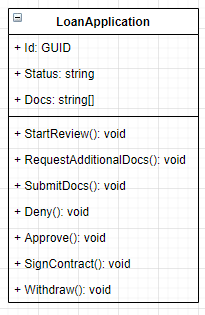
The data-centric approach aka database first is probably the most common approach. Basically, you use the relational paradigm to define objects… this has just one caveat: the result is not objects but tables. You create tables and represent them on code. This was my first approach and I ended with something like:

Good. Does your design look like this? If so, you’re in for a fun ride. Let me show you what I mean. Suppose you want to implement this design. It’ll probably look like:

class LoanApplication
{
   ...
   public string Status {get; private set;}
   public void StartReview()
   {
     if(Status !="Awaiting Review") throw new NotImplementedException();
     //do something here
    Status = "Reviewing";
   }

   public void SubmitDocs()
   {
     if(Status !="Docs Required") throw new NotImplementedException();
     //do something here
    Status = "Reviewing";
   }

   public void Withdraw()
   {
     if(Status !="Awaiting Review" && Status !="Reviewing" && Status !="Approved") 
           throw new NotImplementedException();
     //do something here
    Status = "Cancelled";
   }
 ...
}

You can see where this is going. The actions depend on the current state of the process. So with every new state, you will have to modify the guard clauses for the actions that you want to enable. But if you follow a data-centric approach, you probably won’t be bothered by this. You will assume that’s the only way. Luckily for me, the fact that I had to change different methods every time I introduced a new state, led me to further experimentation.

The behavior centric approach

As the name implies this approach focuses on object behavior. That means that the organizing principle is behavior rather than data. The result is rather radical:

So now you have objects that represent the states in the loan application process. The main benefit is that the code is simplified as only the actions allowed in the current state are advertised. See the difference? The behavior associated with each state is what drives the design. I loved this design. It was simpler. I no longer had to check the state before trying to send a message to the object. The only problem left was how to persist this?

Interaction between paradigms

So now, you’re probably wondering if you have to create many tables to store the data for each object. I have talked about having different models for an application before. This basically means that we can use a data-centric approach for the database design, which is basically the Relational paradigm. At the same time, we can use a behavior-centric approach to design the objects. This behavior-centric approach is at the heart of the Object-Oriented paradigm. Having different models interact with each other is just part of dealing with the impedance mismatch problem. The way I dealt with it was by using the repository pattern. Something like:

This way I had several objects being stored and loaded from a single table. The result was nice relational and object-oriented designs that we’re able to evolve independently.

Closing toughts

Probably the most important idea I learned from this experience is that a concept in the problem space can have several representations on the solution space.

Open your mind to this idea and try experimenting with it on your own project. As always, let me know your thoughts.

Liskov’s substitution explained like I’m five

Liskov’s substitution is one of those topics that are self-evident once you get it. However, explaining it can be tricky since the concept itself relies on other ideas. Besides, there are different aspects that you can deepen on, so you can always find something new to learn about it. Anyway, let’s talk about the main ideas and let the minutiae for another day.

The piano metaphor

I’ll assume that everyone knows what is a piano. If you have seen a piano, you will recognize it even if it is grand piano a digital piano, or even a virtual piano! Likewise, if you know how to play the piano, you can play any kind of piano as long as it behaves as such. Let’s break this down.

The shape

How is it that once you have seen a piano, you have seen them all? I mean, a digital piano is made in a very different way than a grand piano, how come you can identify both? Well, turns out all the pianos in the world share 2 kinds of keys (naturals & flats/sharps) that are set up in a very specific order. No matter what, if you see these keys arranged in that way, you know is a piano. Even if you can’t see under the hood!

The behavior

The reason a piano player can play any piano, is because he knows that a key in a given position will produce a note in a given tone. Since this is the same in every piano, he can confidently play a piece in any kind of piano. There may be some differences in the strength needed to hit the key, but that is irrelevant. The fact that the same key on any piano will give the same tone is a warranty.

The contract metaphor

Bertrand Mayer lay the ideas upon which the Liskov’s substitution was built. The main one is the idea of a contract. It basically says that 2 pieces of code can collaborate safely by doing it through a contract. The contract specifies what services are available, what is required to make use of them (pre-conditions), and what can you expect from them (post-conditions). As you will soon see, this idea of contract has 2 different instances in OOP: at the class level and at the method level.

Class contracts

To better understand Liskov’s substitution principle, you have to understand the idea of contracts, applied to classes.

Simply put is a contract around the “shape”: it specifies the services provided by objects of a certain class. Back to the piano analogy, it states that all pianos have keys in a given order, no matter the size, color, or shape of the body. In code, this kind of contract is expressed as interfaces, classes, or abstract classes.

Another aspect of a class contract it’s around its state: Invariants. Invariants are the rules that must be followed by all instances of the class to be valid, i.e. an hour object cannot have more than 60 minutes and not less than 0.

Method contracts

On the other hand, a contract applied to a method is a contract around “behavior”. It states that not only shape is important for a piano to be a piano: whenever you hit the C key, it has to make a sound on the C tone. The tricky part is that in most languages there are no artifacts (like interfaces) that enforce this kind of contract. Even worse, we ourselves are very lousy at defining this kind of contract.

Imagine the following code:

int Add2(int plus){...}

What would you expect of the following expression?

int result = Add2(plus: 3);

What would you think if the result was anything other than 5 or if it threw an exception? It makes no sense right? The function says that is going to add 2 (name) to an integer (parameter) and return the resulting integer (return type). So given we provide it with a valid value (pre-condition), we would expect a valid value in return (post-condition). There is more to say about this, but I’ll stop here.

The Substitution principle vs the Liskov’s substitution principle

A common confusion when trying to understand Liskov’s substitution principle is with regards to the substitution principle. Let’s fix that.

The substitution principle basically states that a class contract must be respected by it’s subclasses.

The Liskov’s substitution principle states that the invariants and methods’ contracts in a class must be respected by it’s subclasses.

Let’s look at the following example:

  public class Piano
    {
        protected Dictionary<string, Action> Keys;

        public Piano()
        {
            Keys = new Dictionary<string, Action>
            {
                {"C", makeSound(tone:"C")},
                {"C#", makeSound(tone:"C#")},
                {"D", makeSound(tone:"D")},
                {"D#", makeSound(tone:"D#")},
                {"E", makeSound(tone:"E")},
                {"F", makeSound(tone:"F")},
                {"F#", makeSound(tone:"F#")},
                {"G", makeSound(tone:"G")},
                {"G#", makeSound(tone:"G#")},
                {"A", makeSound(tone:"A")},
                {"A#", makeSound(tone:"A#")},
                {"B", makeSound(tone:"B")}
            };
        }
        
        public void Play(string key) => Keys[key].Invoke();

        protected Action makeSound(string tone)
        {          
            //do some magic
        }
        
    }

So the class contract on this Piano class says that there is a Play method. The pre-conditions are to receive a valid key, and the post-condition is that some sound is made. Now check this class:

 public class BadPiano : Piano
    {
        public BadPiano()
        {
            Keys["C#"] = () => throw new NotImplementedException();
            Keys["A"] = makeSound("E");
        }
       
    }

This class violates the Play method contract. If we try to play the tone C# is going to throw an exception and if we try to play the tone “A” it’s going to play “E” instead, whereas its parent won’t. Get it? is not just that the behavior is different than its parent, it’s actually out of the expectations of the client. Using this would at least produce some weird interpretation and at most, it will blow the whole program. Again there’s more to say here but I’ll refrain.

Closing thoughts

I hope this helps you grasp the ideas behind Liskov’s substitution principle. While there’s more to be said about the topic, I wanted this to be an introduction. If you’re interested in learning more, let me know in the comments and I will try to follow up later. Enjoy!

Using metaphors to make the code easy to understand

I mentioned this before, but to me, high-quality code has 3 attributes: it’s easy to understand, easy to change, and correct. I always start with trying to make any piece of code the easiest to understand. If you make it easy to understand, even if it’s not easy to change or correct yet, you are in a much better position than otherwise. Whenever I’m mentoring I always explain it like this: if you can understand the “what” you can change the “how”.

So, making the “what” explicit, that’s the challenge.

The socio-technical space

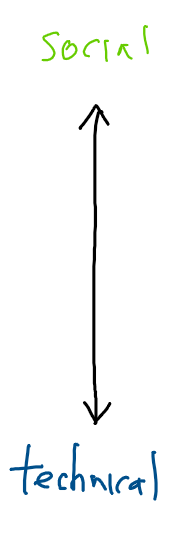
There’s this idea in the DDD circles called socio-technical space. The way I like to think of it is like a continuum that has technical issues/solutions on one side and social issues/solutions on the other.

When you start looking at social issues, the concepts and their interactions provide you with a nice framework where you can reason about the problem. Often, your design will take after these concepts as the building pieces for your solution. That means that if you are working on a system for a banking domain, you likely will have objects like accounts, money, and credit.

But what when you are solving a highly technical problem where the concepts are too vague, abstract, or low level? Well, you can try defining your own concepts to reason the problem and to explain your solution. Or you could use a metaphor.

A technical challenge for you

Exercism.io is a platform to practice solving problems in a programming language. I recommend it to any developer who takes pride in his/her craft. So I was solving the Spiral Matrix problem (login/sign up to access the problem). Before you continue reading I challenge you to solve it. Go on, I’ll wait for you.

So the problem states that given a size you have to create a Matrix[size, size] and you have to fill it with numbers starting from 1 up to the last element. Suppose you have a Matrix[5, 5] then you would have to fill all the slots with numbers 1 to 25. The tricky part is that you have to follow an inward spiral pattern. Are you interested now? try solving it!

Metaphors to the rescue!

The first time I heard about metaphors in the software development realm, was in relation to XP. The idea is simple: use a metaphor to drive the system design. Kent Beck used this on an overall system design level (architecture). But this time I’ll apply it on a smaller scale: the Spiral Matrix solution.

Each XP software project is guided by a single overarching metaphor… The metaphor
just helps everyone on the project understand the basic elements and their relationships.

-Kent Beck, Extreme Programming Explained

Patterns, patterns everywhere!

There are many ways to solve the Spiral Matrix problem. The most obvious solution is to sense the surrounding cells as you move. However, as I was looking at the numbers, I found a pattern in them. Turns out that you can calculate the turning points.

Here I marked all the turning points for a 3×3 matrix. If you lay out the numbers the pattern makes itself visible.

So starting from the right to left, you’ll notice that the distance between the 2 turning points is 1 (where distance is how many spots you’ll have to traverse before finding the next turning point). After the 2 turning points the distance increases by 1. And the sequence goes on. Every 2 turning points the distance increases by 1 until it reaches size-1. I’ll leave it to you to come up with an algorithm to take advantage of this. By the way, the number of turning points is equal to (size * 2) – 2.

Enough talk, show me the code!

So I wanted to make this pattern as obvious as I could, but after the first implementation, it was everything but obvious. After looking closely I noticed there were several things happening at the same time: keeping track of the corresponding number, moving on the grid, and knowing when to turn. So I decided to create objects to handle those responsibilities… but how should I call them?

Sure, you can call your objects however you want, but I wanted to make everything as clear as possible. Easy to understand, remember? So one of the responsibilities was to “navigate” the matrix. This led me to decide on a map. A map helps you navigate right? who could use a map? An Explorer right? after some iterations I ended with something like:

public static int[,] GetMatrix(int size)
    {
        var terrain = new int[size,size];
 
        var compass = new Compass(size);

        new Explorer().ExploreTerrain(terrain, compass);
        
        return terrain;
    }

So imagine you were tasked with starting the numeration at 3 instead of 1. You come and find this code. You’ll probably be puzzled, but the objects make sense to you. Because you understand the relationship between an explorer and the compass. You understand how the compass is used by the explorer. And knowing that, it makes sense to you that the explorer would use a compass to explore a terrain. Actually, it would be weird if he didn’t. But all of this happens in the back of your mind in a fraction of a second, without you really noticing it. So you go and check the ExploreTerrain method.

  public void ExploreTerrain(int[,] terrain, Compass compass)
        {
            while (_stepsTaken <= terrain.Length)
            {
                mapCurrentPosition(terrain);
                adjustDirection(compass);
                advance();
            }
        }

Again, this code is taking advantage of you existing knowledge on the matter of exploration. Wait what is this mapCurrentPosition doing? I think I know, but let’s confirm it.

 void mapCurrentPosition(int[,] terrain) => 
    terrain[_currentPosition.Y, _currentPosition.X] = _stepsTaken;

oh! so it’s putting a number in there… given what we know, this should be the corresponding number… so that is referenced as _stepsTaken! ok, let’s go back. Wait how is adjustDirection accomplished?

   void adjustDirection(Compass compass)
        {
            if(compass.IsTurningPoint(_stepsTaken)) 
                _currentPosition.TurnRight();
        }

So if the compass says that I need to turn at the current step, I turn right (notice how this didn’t puzzle you. Because using a compass to figure out if you need to turn around is something you understand, maybe even experienced before). Maybe we should rename that _stepsTaken variable to _currentStep? let’s go back and figure out what the advance method does.

 void advance() 
        { 
            _currentPosition.Forward();
            _stepsTaken++;
        }

Well, yeah, as expected. Wonder, how does the _currentPosition move forward? (notice we are questioning the “how” not the “what”. We understand what “moving forward” means when exploring). But hold on! where is that _stepsTaken initialized?

class Explorer
    {
        int _stepsTaken  = 1;
        ...
    }

Bingo! let’s initialize this variable to 3 instead of 1 and presto!

class Explorer
    {
        int _stepsTaken  = 3;
        ...
    }

I think you got the idea. If you want to check the details you can find the whole code here.

Closing thoughts

Hopefully at this point the advantages of using a metaphor have become evident (especially in an object oriented system).

Another benefit of using a metaphor is communication. Good metaphors are based on everyday experiences that a lot of people can relate to. This will allow you to convey ideas about the system design/architecture to non-technical people, which becomes increasingly important in agile settings, where the customer is part of the team.

I hope this picks your curiosity about using metaphors in the code. We already do it to explain our ideas in other settings, so why not use it in our code too? I challenge you to do it!